How to create seo friendly blogger post titles?
by default blogger template put your blog title before your blog post title. means in search results viewer is bombard with blog titles. for example your blog name is xyz but you had blogged about trip in africa and now search shows xyz blog - trip to africe while we want to change it to show post titles first and then blog name like trip to africa - xyz blog.
to do that search for this piece of code
< title >< data:blog.pageTitle/ >< /title >
and replace it with
< b:if cond='data:blog.pageType == "index"'>
< title>< data:blog.pageTitle/>< /title>
< b:else/>
< title>< data:blog.pageName/> ~ < data:blog.title/>< /title>< /b:if>
Showing posts with label Tips and Tricks. Show all posts
Showing posts with label Tips and Tricks. Show all posts
Wednesday, March 23, 2011

Saturday, March 19, 2011
How To Add Facebook Comments To Blogger Blog
How To Add Facebook Comments To Blogspot Blog
Step 1
Disable your blogger comments. no point having 2 commenting systems.
Step 2
Generate your Facebook App ID
now you should generate your own facebook app id, it’s really easy and one step process,
just go to this page, facebook developers
Enter Site Name
Enter Site URL
Select Country
Click Creat App button
Next page facebook will generate a lot of information. you need app id for our comment system
Step 3
Codes to Add to your Blog Template
you must add the following codes to your blogger template to ensure that the comments box will work for your blog in the right way.
and in this step we’ll add the following codes,
* xmlns attribute
* SDK script
* Open Graph protocol tags
* Adding the xmlns attribute :
please go to your blogger account again, and navigate to, layout >> edit html >> and check Expand Widget Templates
then find the following code,
you’ll find it on the top of your code. second or third line, and after it add the following code,
xmlns:fb='http://www.facebook.com/2008/fbml'
you must type a space before it and after it,
here is an example.
* Adding the SDK script Code :
search for
and after it add the following code,
but please don’t forget to change YOUR APP ID to your app id ( you got it in the previous step ).
* Adding the Open Graph protocol tags:
copy the following code.
and change the colored text to the following,
Change MY-SITE-NAME with the one you want to appear when a user likes a page. (Gil likes Helping on Facebook)
Change YOUR-APP-ID with your application ID number.
Change YOUR-FACEBOOK-PROFILE-ID with your own facebook user profile ID.
after making this changes add the above code just before
now we finished adding the facebook codes to your template, please don’t touch anything and continue to the next step.
Step 5. Adding the Comments Box to your blogger template.
please find the following code.
and after it, please paste the following code.
To change the width of your comments box, please change 450 to what ever you want, it’s in pixels,
and now please click Save Template , then check your blog. i wish it looks great and works perfectly.
Step 1
Disable your blogger comments. no point having 2 commenting systems.
Step 2
Generate your Facebook App ID
now you should generate your own facebook app id, it’s really easy and one step process,
just go to this page, facebook developers
Enter Site Name
Enter Site URL
Select Country
Click Creat App button
Next page facebook will generate a lot of information. you need app id for our comment system
Step 3
Codes to Add to your Blog Template
you must add the following codes to your blogger template to ensure that the comments box will work for your blog in the right way.
and in this step we’ll add the following codes,
* xmlns attribute
* SDK script
* Open Graph protocol tags
* Adding the xmlns attribute :
please go to your blogger account again, and navigate to, layout >> edit html >> and check Expand Widget Templates
then find the following code,
you’ll find it on the top of your code. second or third line, and after it add the following code,
xmlns:fb='http://www.facebook.com/2008/fbml'
you must type a space before it and after it,
here is an example.
* Adding the SDK script Code :
search for
and after it add the following code,
but please don’t forget to change YOUR APP ID to your app id ( you got it in the previous step ).
* Adding the Open Graph protocol tags:
copy the following code.
and change the colored text to the following,
Change MY-SITE-NAME with the one you want to appear when a user likes a page. (Gil likes Helping on Facebook)
Change YOUR-APP-ID with your application ID number.
Change YOUR-FACEBOOK-PROFILE-ID with your own facebook user profile ID.
after making this changes add the above code just before
now we finished adding the facebook codes to your template, please don’t touch anything and continue to the next step.
Step 5. Adding the Comments Box to your blogger template.
please find the following code.
and after it, please paste the following code.

To change the width of your comments box, please change 450 to what ever you want, it’s in pixels,
and now please click Save Template , then check your blog. i wish it looks great and works perfectly.
Sunday, May 2, 2010
about me
I first saw about me plugin at zackvision.com/weblog/, Liked it enough to add it to mine blog at badtamiz.com/blog but widget was going down to one of the secondary sidebars and not on the primary sidebar. wanted to add a hack but plugin didnt support it nor did I know exactly how to do it. so I hacked the html code instead. they work fine to me lets see if they are for you? just cope the code and replace your id's of respective services with the asteriks,
<a href='http://www.amazon.com/wishlist/*****' rel='me'><img src='https://blogger.googleusercontent.com/img/b/R29vZ2xl/AVvXsEikr9UxU9G4BNjgTW8HfQ90fuLQRcJUPkjBKEA8ZALewE1zbjn9rBpjpCp-XT4BYccO-hwSqnlYI8Re0DzJGouo-Ap3QRAXDFMsrzLdCKmvGcB-3IhvMH53NZifwfb3s6REzuM9uWfrnEQ9/' alt='Amazon Wishlist' title='Amazon Wishlist'/></a>
<a href='http://www.facebook.com/profile.php?id=*****' rel='me'><img src='https://blogger.googleusercontent.com/img/b/R29vZ2xl/AVvXsEiPkB-owzDBjVY7ZaRZ5THy103QIoE3a-E_f7Nl9psx7me7S-xVXNWnb35aENwUdQlmy_1JSGY7DZ7x27hwPYKTSgSvYujUSkwFaYjyqHPAI1fqU_U0x7L7ObFAYbnUG79qLumTz4Ih1BKG/' alt='Facebook' title='Facebook'/></a>
<a href='http://www.google.com/profiles/*****' rel='me'><img src='https://blogger.googleusercontent.com/img/b/R29vZ2xl/AVvXsEjiqIMD1XLUH2Ck3nq34KuyqezB-Mv-qs0vlzuuCDi5DC2PWPIqQMz9XvhCzTEpCmE51gbBSqWANE-qPDL6KnOJ05025vxsXiJ2ulT_6gLeMtyT0jkeOUDICdswPc0N6WIAQDYQLRKLKqnU/' alt='Google Profile' title='Google Profile'/></a>
<a href='http://www.google.com/reader/shared/*****' rel='me'><img src='https://blogger.googleusercontent.com/img/b/R29vZ2xl/AVvXsEjodNBhPTPTiE1hWOuimNIpQhPJ5Zqcjp2EWeQBokXxzexBUXypNfImNz6SqT18U0Wq8Qa7ee5dBdraiqPP24o7WkdhOGdiK8LB54VdRCVKt9L3dR73-GDuWx4AtMEVtgxYuSo_cVMOw3BC/' alt='Google Reader' title='Google Reader'/></a>
<a href='http://picasaweb.google.com/*****' rel='me'><img src='https://blogger.googleusercontent.com/img/b/R29vZ2xl/AVvXsEg0ohDI9BvSi64M7rQaLjNg0ArIYZV6nbIj1L70GGMAuPQhoXb6TAFtxCNonoUEhbzHrb1Jg9y5QEG1fzyPZdR7Rjv5fp-aRi8aE1ObwCmvP3pHZT3SgxB-6Eo-3jWzGCCgyT6DwZvutxsj/' alt='Picasa Web Album' title='Picasa Web Album'/></a>
<a href='http://twitter.com/*****' rel='me'><img src='https://blogger.googleusercontent.com/img/b/R29vZ2xl/AVvXsEgN8bN_iTR-24Uu4djbUcBFlhNR51Rl9kTMuAVYHxF5z7eymeXkR4HBziwFuVclfvFOUfiQ68Kk9EQ6LwdO243pVLib8vnDj5Lnbxhhb2N0TRbf2lXXEZ-BHUhn8RFBmmQyhrTunwqB5gwH/' alt='Twitter' title='Twitter'/></a>
<a href='http://www.youtube.com/*****' rel='me'><img src='https://blogger.googleusercontent.com/img/b/R29vZ2xl/AVvXsEjcNF-S0R9fwCIQOcECwCxgETlb_TFaJpRx8Fl58dvjOWoi21IGi46SXAZnEQZW66UeGpnAIIpAzMjMz7UQ8_quBwNLYhEMxNTepnr6Kxz5W9iaUkDOk53eedh5uBhzNICAuJ0CjQQZSVqm/' alt='YouTube' title='YouTube'/></a>
<a href='http://www.amazon.com/wishlist/*****' rel='me'><img src='https://blogger.googleusercontent.com/img/b/R29vZ2xl/AVvXsEikr9UxU9G4BNjgTW8HfQ90fuLQRcJUPkjBKEA8ZALewE1zbjn9rBpjpCp-XT4BYccO-hwSqnlYI8Re0DzJGouo-Ap3QRAXDFMsrzLdCKmvGcB-3IhvMH53NZifwfb3s6REzuM9uWfrnEQ9/' alt='Amazon Wishlist' title='Amazon Wishlist'/></a>
<a href='http://www.facebook.com/profile.php?id=*****' rel='me'><img src='https://blogger.googleusercontent.com/img/b/R29vZ2xl/AVvXsEiPkB-owzDBjVY7ZaRZ5THy103QIoE3a-E_f7Nl9psx7me7S-xVXNWnb35aENwUdQlmy_1JSGY7DZ7x27hwPYKTSgSvYujUSkwFaYjyqHPAI1fqU_U0x7L7ObFAYbnUG79qLumTz4Ih1BKG/' alt='Facebook' title='Facebook'/></a>
<a href='http://www.google.com/profiles/*****' rel='me'><img src='https://blogger.googleusercontent.com/img/b/R29vZ2xl/AVvXsEjiqIMD1XLUH2Ck3nq34KuyqezB-Mv-qs0vlzuuCDi5DC2PWPIqQMz9XvhCzTEpCmE51gbBSqWANE-qPDL6KnOJ05025vxsXiJ2ulT_6gLeMtyT0jkeOUDICdswPc0N6WIAQDYQLRKLKqnU/' alt='Google Profile' title='Google Profile'/></a>
<a href='http://www.google.com/reader/shared/*****' rel='me'><img src='https://blogger.googleusercontent.com/img/b/R29vZ2xl/AVvXsEjodNBhPTPTiE1hWOuimNIpQhPJ5Zqcjp2EWeQBokXxzexBUXypNfImNz6SqT18U0Wq8Qa7ee5dBdraiqPP24o7WkdhOGdiK8LB54VdRCVKt9L3dR73-GDuWx4AtMEVtgxYuSo_cVMOw3BC/' alt='Google Reader' title='Google Reader'/></a>
<a href='http://picasaweb.google.com/*****' rel='me'><img src='https://blogger.googleusercontent.com/img/b/R29vZ2xl/AVvXsEg0ohDI9BvSi64M7rQaLjNg0ArIYZV6nbIj1L70GGMAuPQhoXb6TAFtxCNonoUEhbzHrb1Jg9y5QEG1fzyPZdR7Rjv5fp-aRi8aE1ObwCmvP3pHZT3SgxB-6Eo-3jWzGCCgyT6DwZvutxsj/' alt='Picasa Web Album' title='Picasa Web Album'/></a>
<a href='http://twitter.com/*****' rel='me'><img src='https://blogger.googleusercontent.com/img/b/R29vZ2xl/AVvXsEgN8bN_iTR-24Uu4djbUcBFlhNR51Rl9kTMuAVYHxF5z7eymeXkR4HBziwFuVclfvFOUfiQ68Kk9EQ6LwdO243pVLib8vnDj5Lnbxhhb2N0TRbf2lXXEZ-BHUhn8RFBmmQyhrTunwqB5gwH/' alt='Twitter' title='Twitter'/></a>
<a href='http://www.youtube.com/*****' rel='me'><img src='https://blogger.googleusercontent.com/img/b/R29vZ2xl/AVvXsEjcNF-S0R9fwCIQOcECwCxgETlb_TFaJpRx8Fl58dvjOWoi21IGi46SXAZnEQZW66UeGpnAIIpAzMjMz7UQ8_quBwNLYhEMxNTepnr6Kxz5W9iaUkDOk53eedh5uBhzNICAuJ0CjQQZSVqm/' alt='YouTube' title='YouTube'/></a>
Friday, April 9, 2010
Blogger Template Designer
Finally a long awaited blogger template designer is out. we were always wondering when google will pay attention to blogger and it seems they just heard us. I know they are working on this for some time now and soon blogger is going to be the best blogging plateform. its not a wish I know it for sure.
http://www.blogger.com/templates
blogger in draft
http://draft.blogger.com/home
http://www.blogger.com/templates
blogger in draft
http://draft.blogger.com/home
The Blogger Template Designer makes it easy to customize the look and feel of your blog without knowing any HTML or CSS. Here are a few of the new features available in the Blogger Template Designer:
* Beautiful new templates to start from
* Custom blog layouts with one, two and three columns
* Hundreds of background images
* Customizable colors, fonts, and more...
Sunday, March 28, 2010
How To Make A Mobile Friendly Version of Blogspot Blogs
after making a mobile friendly version of my blog I tried on blogspot but found nothing on the web. there were some services who could transform the posts into an output for mobile devices like feedm8.com or using the google reader but nothing would automatically detect either its a mobile device or not.
mobify seemed to do the trick but there free service would only make the first page mobile friendly and would take you to the actual page. for the whole site you need to buy the subscription which wasnt what I hoped for. also a big draw back was that you were then using there URL.
a few services would let you use your very own m.yoursite.com URL but they were all with if you have access to the backend or server side glitch.
so what I did was I used mobify mobile detection script and redirected it to a google reader page view. it worked.


but then I found something. google reader was awesome but was eliminating the posts from the views as you view them. mean you possible cant view an already view post until you clear the cache. for me that was a no no.

Now I tried to rather using google reader how about simply just accessing the feed? I mean that sure would be faster than the actuall site and should be faster to load and lower on size.


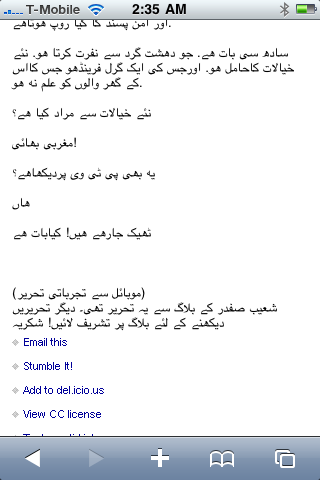
I am not sure about others but I would definately redirect to my feed rather full site as its faster to load and ppls can read my contents rather not at all. and this should work until google unviels all the gadgets its been preparing for blogspot.
special thanks to shoaib safdar for letting me experiment on his blog. his mobile friednly version can be viewed at http://www.feedm8.com/pensive
mobify seemed to do the trick but there free service would only make the first page mobile friendly and would take you to the actual page. for the whole site you need to buy the subscription which wasnt what I hoped for. also a big draw back was that you were then using there URL.
a few services would let you use your very own m.yoursite.com URL but they were all with if you have access to the backend or server side glitch.
so what I did was I used mobify mobile detection script and redirected it to a google reader page view. it worked.


Now I tried to rather using google reader how about simply just accessing the feed? I mean that sure would be faster than the actuall site and should be faster to load and lower on size.


special thanks to shoaib safdar for letting me experiment on his blog. his mobile friednly version can be viewed at http://www.feedm8.com/pensive
Subscribe to:
Posts (Atom)